Streamlate
Source code

Free · open source · for Twitch, YouTube & Kick

Stream in one language. Be understood in thirty.

Streamlate translates your chat into your language as it arrives, and turns your voice into live subtitles your viewers read in theirs. It runs on your own PC — no account, no subscription.

Free forever (MIT)Windows 10 & 11, 64-bitAny PC — no gaming GPU needed

Windows may warn you the first time: click More info → Run anyway. Why does that appear?

Two directions, one app

Your chat talks to you. You talk to everyone.

CHAT → YOUR LANGUAGE

Read every message, whatever language it's in

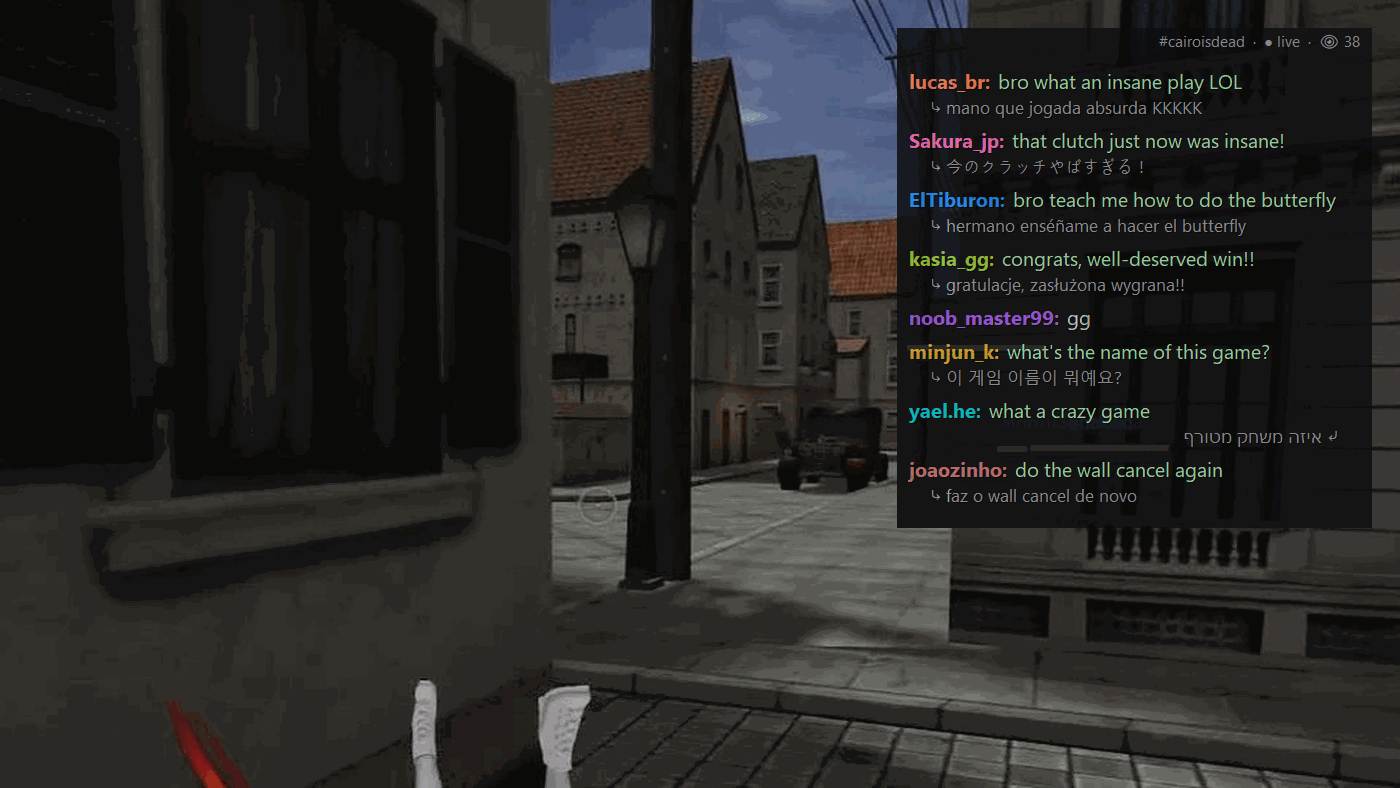
  • On your screen: a chat overlay you can play through — clicks go straight to your game, and it fades when your cursor comes near.
  • On your phone: scan a QR code and your translated chat follows you around the room.
  • Out loud: have chat read to you in a natural voice, with or without usernames.

YOUR VOICE → THEIR LANGUAGE

Talk normally. Viewers read you in their language

  • Live subtitles appear on your stream as you speak — a caption source that adds itself to OBS.
  • Twitch's own CC button can carry them too, so viewers switch captions on and off themselves.
  • Mix languages freely: it detects which language you're speaking, line by line.

And the rest

Built by a streamer, for a bilingual chat

Viewers QR
Put a QR code on stream. Viewers scan it and read the whole chat translated into their language, on their phone.
Voice link
Share one link. Each friend reads what you say in the language they pick — nothing to install on their side.
Voice-chat translation
Teammates on Discord or in-game voice speaking another language? Their words show up translated. No virtual cables.
Viewer modebeta
Watching someone else's stream? Streamlate subtitles what they say, and can translate text on your screen.
Subtitle files for your VODs
Every session is saved as an .srt file, ready to upload with the video.
Family-friendly filter
Optionally masks swear words in everything your viewers see.
Gamer slang that survives
“kkkk”, “GG”, “clutch” and your game's own terms come through the way gamers actually say them.
Fixes itself
Updates when you open it, repairs missing pieces, and copies an error report in one click if something breaks.
The app

Two windows, both simple

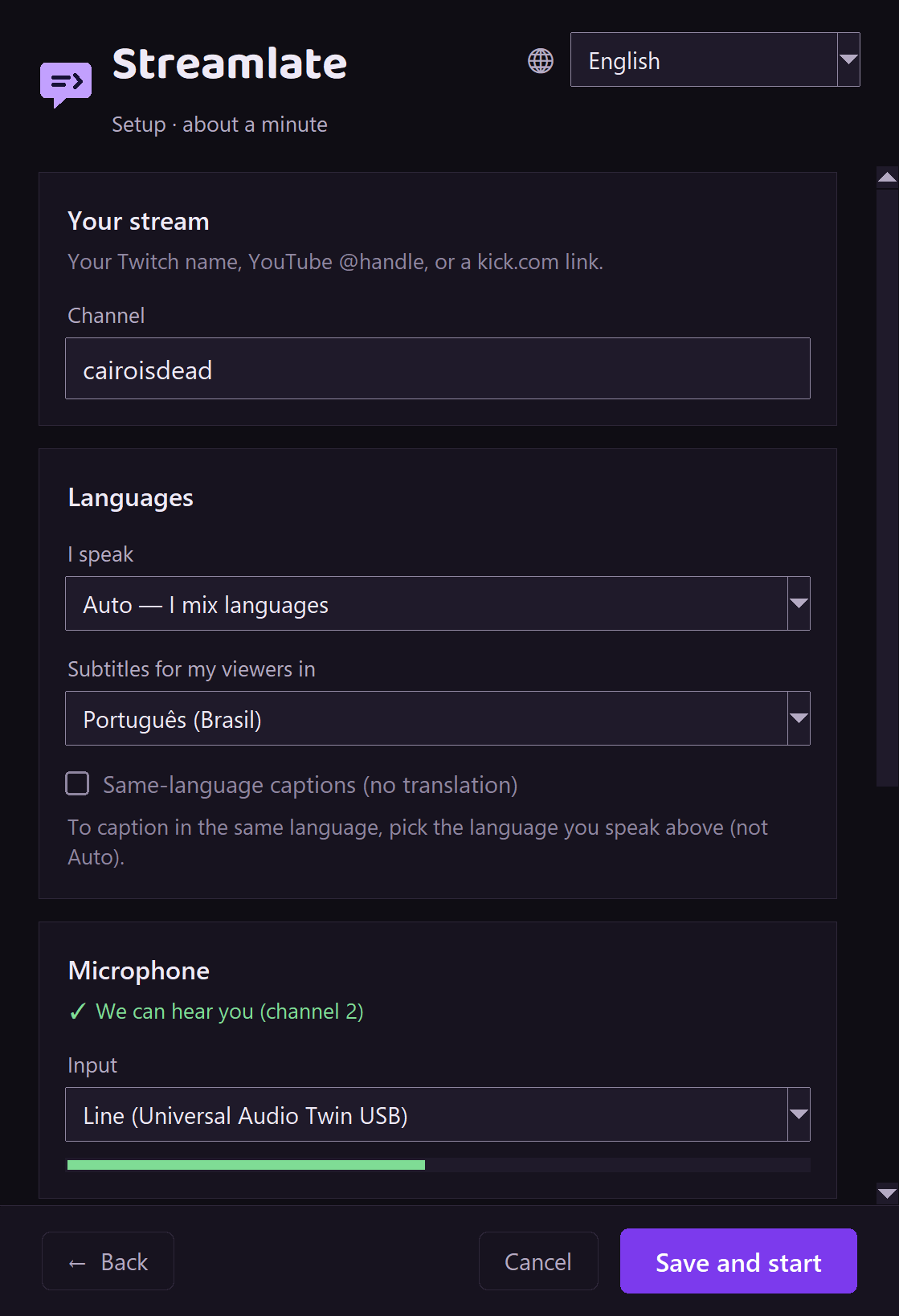
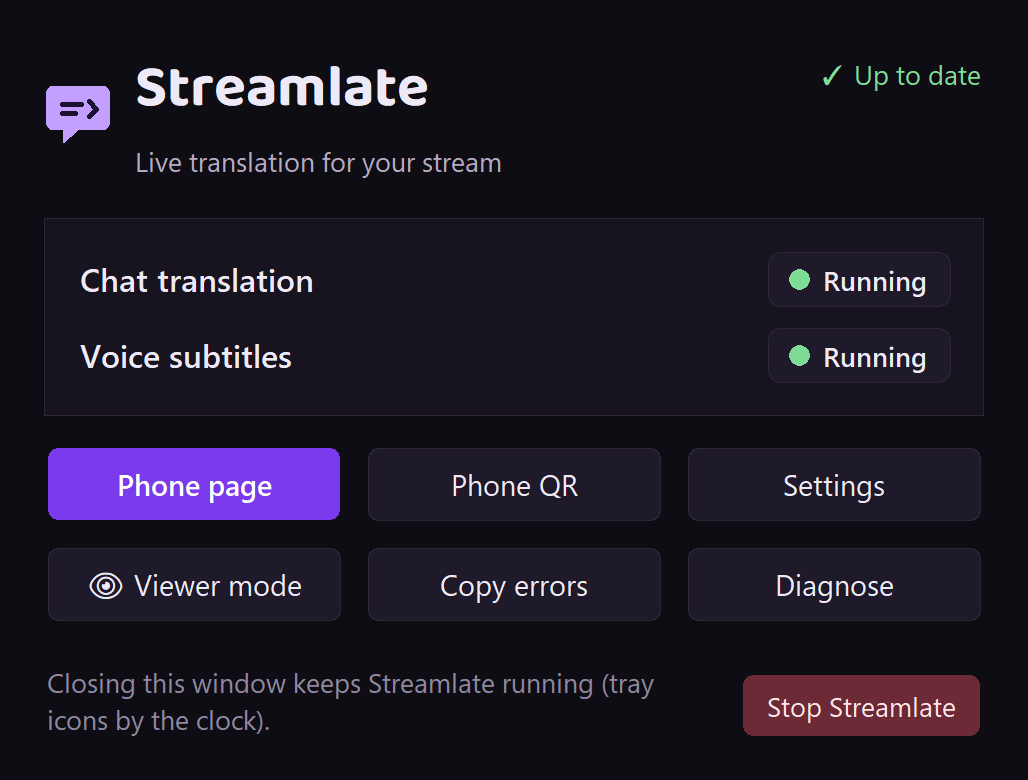
A one-page setup the first time, then a small control panel that shows what's running. Everything else lives in the tray by the clock.

The Streamlate setup window: channel name, the language you speak, the subtitle language for viewers, the microphone with a level meter, and a Save and start button.
Setup: channel, languages, microphone. About a minute.
The Streamlate control panel showing Chat translation and Voice subtitles as running, with buttons for Phone page, Phone QR, Settings, Viewer mode, Copy errors and Diagnose.
The control panel: status at a glance, help one click away.
The Streamlate chat overlay over GunZ gameplay: chat messages from Portuguese, Japanese, Spanish, Polish, Korean and Hebrew speakers, each shown translated into English with the original underneath.
The overlay: every message in your language, the original underneath.
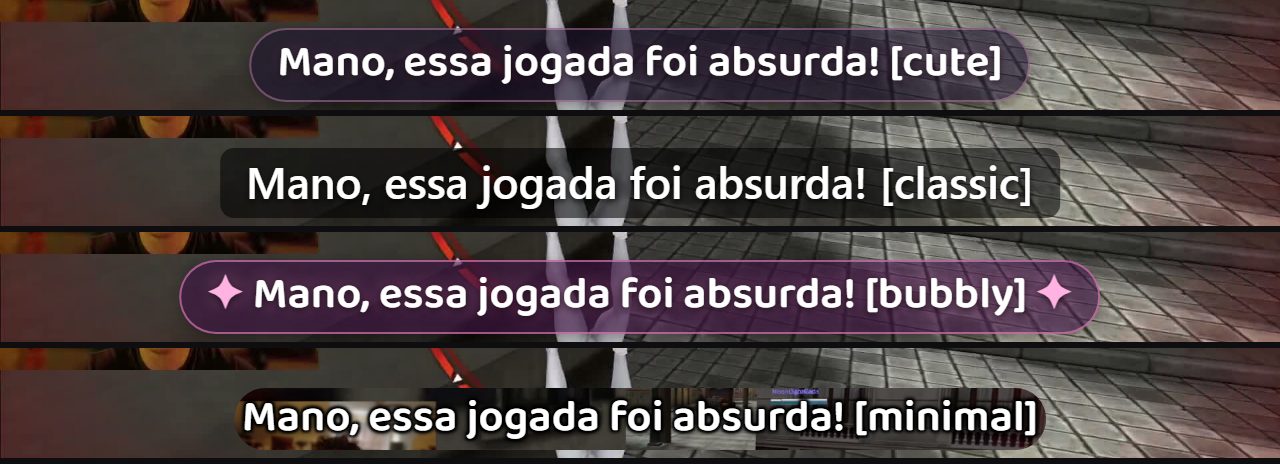
The same Portuguese subtitle, “Mano, essa jogada foi absurda!”, shown in the four caption looks over gameplay: Cute, Classic, Bubbly and Minimal.
Caption looks: Cute, Classic, Bubbly, Minimal.

How it works

Three steps, no config files

  1. Run the installer

    A normal Windows installer with no admin prompt. It brings everything it needs; NVIDIA PCs download one extra speech library on first launch.

  2. Type your channel

    One settings window: your Twitch, YouTube or Kick channel, the language you speak, the language your viewers read, and your mic.

  3. Go live

    Your chat shows up translated. In OBS the caption source adds itself; in other streaming apps you add one browser source once.

Works with

  • OBS Studiosets itself up
  • Streamlabs Desktopsets itself up (beta)
  • XSplit · vMixone browser source
  • Twitch · YouTube · Kickchat, anonymously
  • Discordany voice chat

Game-safe by default

It picks the right AI for your PC

Streamlate checks your graphics card once and chooses. Your game always comes first.

Speech recognition always runs on your PC — on NVIDIA graphics cards when possible, otherwise on the processor. Change the translation engine anytime from the tray; your choice sticks.
Your graphics cardTranslation engineExtra downloadGraphics memory used
No NVIDIA card, or under 12 GB (AMD, Intel, laptops)Free online engine—0 GB
NVIDIA with 12–19 GBLocal AI, small (Gemma 3 4B)≈ 3 GB≈ 4 GB
NVIDIA with 20 GB or moreLocal AI, best quality (Qwen 27B)≈ 17 GB≈ 18–20 GB

Playing something heavy? Pick “Zero GPU” under Translation quality in the tray and Streamlate frees your graphics card instantly.

Languages

30 languages on stream. 8 in the app.

Chat and captions

  • English
  • Português
  • Español
  • Français
  • Deutsch
  • Italiano
  • Nederlands
  • Polski
  • Čeština
  • Svenska
  • Dansk
  • Norsk
  • Suomi
  • Română
  • Magyar
  • Ελληνικά
  • Български
  • Українська
  • Русский
  • Türkçe
  • العربية
  • עברית
  • हिन्दी
  • ไทย
  • Tiếng Việt
  • Indonesia
  • Melayu
  • 日本語
  • 中文
  • 한국어

The app itself speaks

  • English
  • Português (BR)
  • Español
  • עברית
  • Polski
  • 日本語
  • 中文
  • 한국어

Chat can arrive in any language Google Translate knows. The app follows your Windows language automatically.

Captions for every viewer, including deaf and hard-of-hearing viewers

Set the subtitle language to the one you speak and Streamlate becomes a free live-caption tool in your own language, with Twitch's CC button supported.

This site follows WCAG 2.2 AA guidance: readable type, strong contrast, full keyboard use and a pausable demo.

Before you download

What you need

  • Windows 10 or 11, 64-bit
  • An internet connection for installing, reading chat and the free translation engine
  • A microphone for subtitles of your voice
  • No special graphics card. NVIDIA cards with 12 GB or more get local AI translation

Privacy

What leaves your PC

Your voice stays on your PC
Speech recognition runs locally; audio is never uploaded. Only the text of what you said is translated.
Translation
With the free online engine, chat text and your spoken text go to Google Translate. With a local AI it stays on your PC; Google is used only as a fallback, and always for Viewer mode and the Voice link page.
Read-aloud voices
Chat read aloud uses Microsoft's online voices, so that text goes to Microsoft; an offline Windows voice is the fallback.
Public links, only when you switch them on
Viewers QR, and the Voice link when you choose “Share with anyone”, publish a temporary link through Cloudflare. Anyone with it can read the translated chat or your speech until you switch it off.
No account, no tracking
Chat is read anonymously and Streamlate can't post. No analytics; it checks Streamlate's own server for updates. Full privacy notes

Questions streamers ask

Windows says “Windows protected your PC”. Is it safe?

Click More info, then Run anyway. Windows shows this for new apps that aren't code-signed yet. Streamlate is open source, so anyone can read exactly what it does on its code site.

If Windows says Smart App Control blocked it, there is no Run-anyway button: that setting only allows signed apps. A signed installer is on the way — follow the releases page.

Will it lag my game?

It runs at low priority. On PCs with less than 12 GB of graphics memory it uses no GPU for translation by default, and one click in the tray frees the GPU on any PC. It never injects into games, so it's safe with anti-cheat.

Is it really free?

Yes. MIT-licensed open source, with no account, no paywall, no ads and no time limit.

I have an AMD or Intel graphics card. Does it work?

Yes. Translation uses the free online engine and speech recognition runs on your processor.

Can it get my Twitch account in trouble?

No. It reads chat anonymously, the same way a logged-out viewer sees it, and it can't post anything.

Do my viewers need to install anything?

No. Subtitles are part of your video, and the Viewers QR and Voice link pages open in any phone browser.

Do I need OBS?

Only for subtitles on stream. OBS and Streamlabs Desktop set themselves up; XSplit, vMix and anything with a browser source need one source added once. Chat translation needs nothing.

Mac or Linux?

Windows only for now.

How do I uninstall it?

Windows Settings → Apps → Installed apps → Streamlate → Uninstall. It asks whether to keep your settings.

Something isn't working. What do I do?

Open Streamlate, click Copy errors in the control panel, and email it to support@dabkowski.dev (more help). Repair & restart fixes most install problems by itself.

Ready for a chat that understands itself?

Download for Windows